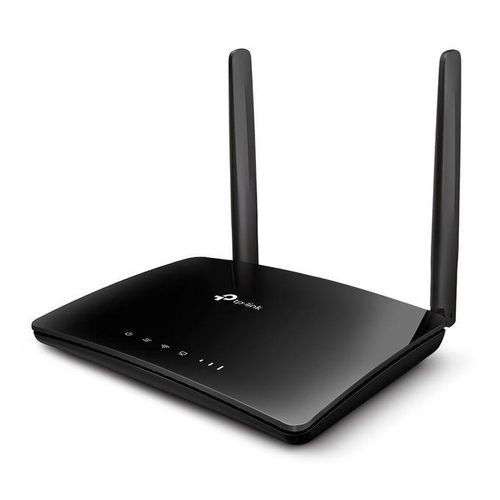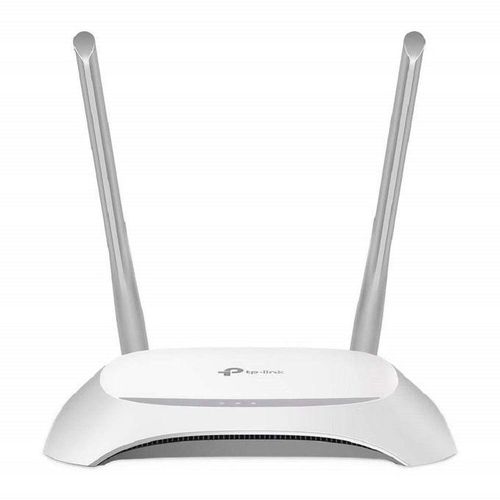
TP-Link 300Mbps Wireless Router

Up to 300 Mbps on 2.4 GHz band
Four external antennas for 1500 sq ft coverage
Four LAN ports and WPS security
QoS for prioritizing traffic
Compact design with wall-mount option

KSh 7,250.00

Description

TP-Link 300Mbps Wireless Router
The TP-Link 300Mbps Wireless Router provides reliable Wi-Fi coverage for home and small office networks. This compact N300 device supports speeds up to 300 Mbps on 2.4 GHz band. It features four antennas for stable connections. WPS button enables quick encryption setup. The easy web interface simplifies management. Ideal for streaming and browsing, it includes guest network support. Energy-efficient design reduces power draw to 3 watts idle. Covers up to 1500 sq ft for multiple devices.
Detailed Use Cases and Compatibility
TP-Link 300Mbps Wireless Router in Home Networks
This router enhances home internet for families. Stream videos on TVs and laptops simultaneously. The 300 Mbps speed handles HD content smoothly. Four LAN ports connect printers and consoles.

It supports 802.11n standard with WPA2 security. Compatible with modems from ISPs like Safaricom. Shop cables at Threeways Gadget Hub. The QoS feature prioritizes gaming traffic. Up to 32 devices connect without lag. WPS pairs smartphones instantly. Firmware updates via TP-Link site improve stability.
TP-Link 300Mbps Wireless Router for Small Offices
Small offices benefit from its stable Wi-Fi. Employees access shared drives and emails reliably. Guest network isolates visitors from main system. The antennas extend signal to back rooms.

Works with Windows 11 and macOS 14+ seamlessly. Ethernet ports link desktops. Learn network tips from Cisco Networking Academy. Pair with laptops in laptops category. The 3×3 MIMO boosts throughput. VPN passthrough enables remote work. Easy reset button restores defaults quickly.
TP-Link 300Mbps Wireless Router in Student Dorms
Students use it for online classes and downloads. The 300 Mbps bandwidth supports video calls without drops. Connect tablets and phones for group study. Guest mode prevents unauthorized access.

Compatible with Chrome OS via Wi-Fi. Mopria certification aids printing. Explore edtech from EdSurge. Explore desktops at desktop computers. The compact size fits dorm desks. Parental controls limit bandwidth. LED indicators show connection status clearly.
TP-Link 300Mbps Wireless Router for Casual Gaming
Gamers enjoy lag-free sessions with QoS prioritization. The router handles consoles and PCs together. Four antennas reduce interference in apartments. WPA2 encryption secures online matches.

Supports Xbox and PlayStation networks. The 2.4 GHz band penetrates walls well. Read gaming guides on IGN. Enhance with gaming gear in gaming category. Up to 1500 sq ft coverage suits small homes. One-touch WPS secures devices fast. Detachable antennas allow upgrades.

This router adapts to various ISPs with PPPoE support. Print from mobiles via guest network. TP-Link Tether app manages settings remotely. Users report 95% uptime in reviews. Firmware auto-checks for updates. Compared to older models, it offers better range. In Kenya’s urban areas, it handles multi-device loads effectively. Ventilation slots prevent overheating during use. Wall-mount option saves space.
Technical Specifications
Wireless Performance
Standard: IEEE 802.11n/g/b. Frequency: 2.4 GHz. Speed: Up to 300 Mbps. Antennas: 4 external.
Ports and Connectivity
LAN ports: 4 x 10/100 Mbps. WAN port: 1 x 10/100 Mbps. USB: None. Security: WPS, WPA/WPA2.
Hardware Details
Processor: Single-core 400 MHz. Memory: 32 MB RAM, 4 MB flash. Buttons: WPS/Reset, Power.
Physical Dimensions
Size: 202 x 141 x 34 mm. Weight: 0.42 kg. Power: 9V/0.6A adapter.
Features
Modes: Router, AP. Guest network: Yes. QoS: Yes. VPN: Passthrough.
Warranty and Support Assurance
Threeways Gadget Hub stands behind every network device with solid service. The TP-Link 300Mbps Wireless Router includes a three-year limited TP-Link warranty. Coverage addresses defects in materials and workmanship fully. On-site support available across Kenya for eligible claims.

Extend protection via TP-Link extensions. Free assistance through phone and email. Download firmware from TP-Link’s portal anytime. Genuine accessories stocked locally. Visit TP-Link Support for details. Browse software in software category.

Specification

Overview

Customer Reviews

Reviews

There are no reviews yet.

Be the first to review “TP-Link 300Mbps Wireless Router”

Your email address will not be published. Required fields are marked *