





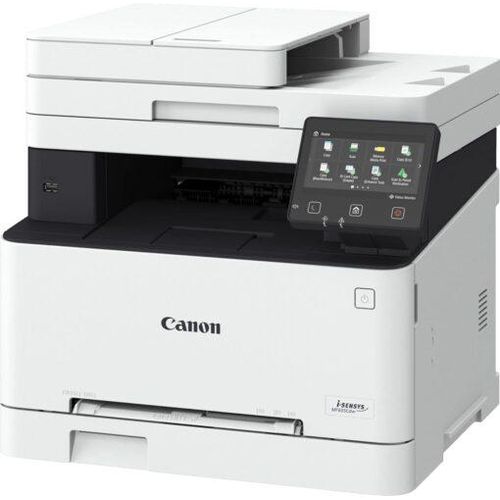

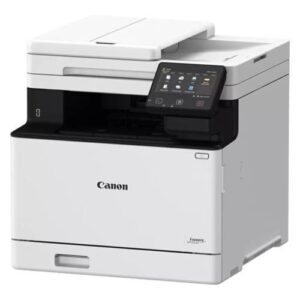
Canon i-SENSYS MF655Cdw Colour Laser Multifunction Printer
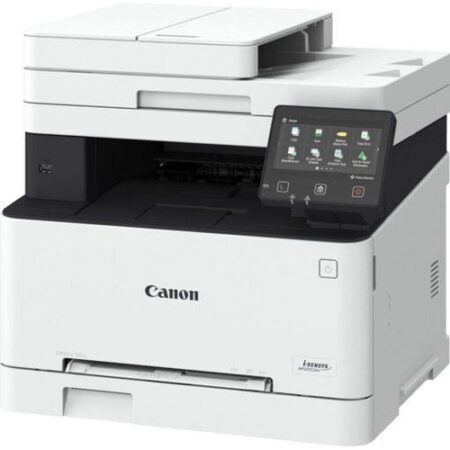
The Canon i-SENSYS MF655Cdw is a 3-in-1 colour laser multifunction printer designed for small to medium-sized offices, offering print, scan, and copy functions. It features Wi-Fi, Ethernet, and cloud connectivity for seamless printing from mobile devices and computers via Canon PRINT Business, AirPrint, Mopria, and cloud platforms like Google Drive, Dropbox, and OneDrive. With print speeds of up to 21 ppm (A4) and automatic duplex printing, it ensures efficient workflows. The printer uses Canon Genuine Toner 067/067H, delivering up to 1,350/3,130 black pages and 1,250/2,350 colour pages, and includes a 12.7 cm colour touchscreen for intuitive operation. Its compact design and robust security features, such as Secure PIN and Verify System at Startup, make it ideal for secure, high-quality printing. Find it at Canon Europe or Threeways Gadget Hub.
Versatile Use Cases for Canon i-SENSYS MF655Cdw Colour Laser Multifunction Printer
Small Office and Hybrid Work Productivity
The MF655Cdw is perfect for small offices, delivering vibrant colour prints at 21 ppm (A4) and 12.7 ipm (duplex) for documents like reports, presentations, or invoices using tools like Microsoft Office or Adobe Acrobat. The 50-sheet ADF and 250-sheet cassette support high-volume tasks, while Wi-Fi and Ethernet enable network sharing. The Application Library automates tasks like printing stored forms or scanning to email. Explore office solutions at Threeways Gadget Hub’ software category.
Creative and Marketing Material Printing
With a print resolution of 1200×1200 dpi, the MF655Cdw produces sharp text and vibrant graphics, suitable for marketing materials like flyers or brochures on plain, recycled, or coated paper (up to 200 g/m²). The multipurpose tray handles envelopes and postcards, ideal for small-scale promotional campaigns. Canon’s PosterArtist software supports creative outputs. Find compatible media at Threeways Gadget Hub’ accessories category.
Home Office and Remote Work
For home offices, the MF655Cdw’s compact footprint (451 x 460 x 360 mm) and Wi-Fi Direct allow printing from mobile devices without a router, using Canon PRINT Business, AirPrint, or Mopria. The flatbed scanner (600×600 dpi, up to 9600×9600 dpi enhanced) digitizes documents efficiently for remote collaboration. The 12.7 cm touchscreen simplifies setup and operation. Discover more printers at Threeways Gadget Hub’ laptops category.
Eco-Conscious Workspaces
The MF655Cdw is ENERGY STAR certified and EPEAT Silver rated, with low power consumption (0.8W sleep, 0.1W off) and duplex printing to reduce paper waste. High-yield toners and recyclable packaging minimize environmental impact, making it a sustainable choice. For eco-standards, visit ENERGY STAR certifications.
Compatibility of Canon i-SENSYS MF655Cdw Colour Laser Multifunction Printer
Software Compatibility
The MF655Cdw supports Windows (7 SP1 or later), macOS (10.12 or later), Linux (printing only), and Chrome OS, with drivers for printing, scanning, and copying. Canon PRINT Business, AirPrint, Mopria, and MF Scan Utility enable mobile and cloud printing to platforms like Google Drive and Dropbox. Some macOS features may be limited. For drivers, visit Canon’s support page.
Hardware Connectivity
The printer includes USB 2.0, Wi-Fi (802.11 b/g/n), and Ethernet (10/100Base-T), supporting A4, A5, B5, Legal, Letter, envelopes, and custom sizes (76.2 x 127 mm to 216 x 355.6 mm) via a 250-sheet cassette, 1-sheet multipurpose tray, and 50-sheet ADF. Wi-Fi Direct supports up to five devices. Note: USB and network cables are not included. For connectivity details, see Canon’s usage guide.
System Integration
The MF655Cdw integrates with office networks via Wi-Fi or Ethernet, supporting secure printing with UFRII and PCL 5c/6 languages. The 1GB RAM and dual 800 MHz processors handle complex jobs, and the Application Library enables one-touch workflows. Security features include TLS 1.3, IP/MAC filtering, and SNMPv3. The printer supports Canon’s iW Enterprise Management Console for fleet management.
Technical Specifications
- Print Technology: Colour laser beam printing
- Functions: Print, scan, copy (3-in-1)
- Print Speed: Single-sided: 21 ppm (A4), 38 ppm (A5-Landscape); Duplex: 12.7 ipm (A4)
- First Page Out: Mono: ~10.4 sec; Colour: ~10.5 sec
- Print Resolution: Up to 1200×1200 dpi
- Toner: Canon Genuine Toner 067 (1,350 black/1,250 C/M/Y pages), 067H (3,130 black/2,350 C/M/Y pages); Starter: 1,350 black/680 C/M/Y pages
- Scan Resolution: 600×600 dpi (optical), up to 9600×9600 dpi (enhanced)
- Copy Speed: 21 ppm (single-sided), 12.7 ipm (duplex); Resolution: 600×600 dpi
- Paper Handling: 250-sheet cassette, 1-sheet multipurpose tray, 50-sheet ADF, 100-sheet output
- Media Types: Plain, recycled, heavy, thin, colour, coated paper, labels, postcards, envelopes (60–200 g/m²)
- Ports: USB 2.0, Wi-Fi (802.11 b/g/n), Ethernet (10/100Base-T)
- Display: 12.7 cm (5-inch) colour touchscreen LCD
- Power: 100-240V, 50/60Hz, 370W (printing), 11W (standby), 0.8W (sleep), 0.1W (off); TEC: 0.19 kWh/week
- Weight: ~22.6 kg
- Dimensions: 451 x 460 x 360 mm
- Color: White
- Additional Features: Auto-duplex printing, Secure PIN, Verify System at Startup, cloud printing (Google Drive, Dropbox, OneDrive), Application Library, ENERGY STAR certified
- Warranty: 2 years (UAE, Europe), 1 year (South Africa, select regions); 3-year option in some regions
- Certifications: ENERGY STAR, EPEAT Silver, RoHS
- Included: Printer, Toner 067 Starter (1,350 black/680 C/M/Y pages), power cord, setup guide, software CD-ROM (Windows only)
Trust in Quality and Support
Threeways Gadget Hub offers the Canon i-SENSYS MF655Cdw with a 2-year warranty (UAE, Europe) or 1-year warranty (South Africa, select regions), with a 3-year option in some regions if registered within 30 days. Our Nairobi-based support team assists with setup, toner replacement, or troubleshooting. The eco-friendly design with duplex printing and low power use aligns with sustainability standards. Contact us at Threeways Gadget Hub or Canon’s support page.



Reviews
There are no reviews yet.